There is currently an issue with catalogue renewals and pop-ups via the Safari browser on iPads and iPhones.
After
selecting your items a pop-up comes up asking if you are sure you want
to renew, but you get no response when you tap Yes or No.
Solutions:
1. Download the ERL Libraries app from the App Store.
On an iPad if it doesn't appear in search results be sure to select
iPhone Only from the first drop-down menu in the App Store. It is an
iPhone app but can be used on an iPad.
2. Use another browser eg Chrome. The issue only occurs with Safari.
3. Tap in the white area of the pop-up and then tap on the yes button.
Hopefully the issue will be resolved soon.
Cheers, webgurl
Note: Thanks Casey-Cardinia Library Corporation for the tips.

Showing posts with label troubleshooting. Show all posts
Showing posts with label troubleshooting. Show all posts
Tuesday, June 02, 2015


Friday, April 02, 2010
Family History troubleshooting
Being hindered in your Family History research? Let the Family History team at Eastern Regional Libraries help you overcome those hurdles.
Bring your 'hurdle' to the session, anythime between 10am-3pm on the 17th April.
When: Saturday 17th April 10am-3pm
Where: Ringwood Library, 4 Ringwood Street Mall, Ringwood
Cost: Free event
Bookings essential phone 98700177
Cheers, Maryanne
Bring your 'hurdle' to the session, anythime between 10am-3pm on the 17th April.
When: Saturday 17th April 10am-3pm
Where: Ringwood Library, 4 Ringwood Street Mall, Ringwood
Cost: Free event
Bookings essential phone 98700177
Cheers, Maryanne
Friday, November 06, 2009
A workaround for viewing My Account in Opera
Thanks to Andrew for suggesting a workaround for Opera users when using the Review My Account screen.
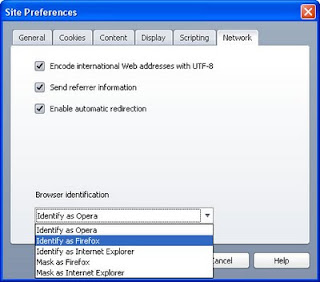
I tested it with Opera 10 and it works fine. You'll be able to see the checkouts and holds.
Cheers, Maryanne
- Go to our catalogue in Opera at http://swft.erlc.sirsidynix.net.au.
- Go to Tools > Quick Preferences > Edit Site Preferences in the browser menu at the top.
- Click on the Network tab
- Select either Identify as Firefox or Identify as Internet Explorer from the drop-down box. Also works if you select Mask.

I tested it with Opera 10 and it works fine. You'll be able to see the checkouts and holds.
Cheers, Maryanne
Subscribe to:
Posts (Atom)