For your delight and delectation we have added 260 new audiobook titles and 717 new eBook titles to the eLibrary. You can browse and peruse these new titles by doing an Advanced Search and choosing Within the last 7 days in the drop down menu next to Date added to site.
Amongst the audiobooks you will find works by Dick Francis, Frederick Forsyth, David Attenborough, Nick Hornby and P.D. James. The eBooks have titles written by Augusten Burroughs; the Inspector George Gently series by Alan Hunter; horror stories from the pens of Graham Masterton and Phil Rickman; plus many of the Text series of classic Australian books including Miles Franklin's My Brilliant Career and Nino Culotta's They're a Weird Mob.
Happy eReading and eListening.
Cheers, Paul.

Showing posts with label e-library. Show all posts
Showing posts with label e-library. Show all posts
Thursday, May 17, 2012


Wednesday, May 09, 2012
Changes to ERL eLibrary
We have changed the borrowing periods for both eBooks and eAudiobooks in the eLibrary. All items can now be borrowed for 21 days in order to give you more time to read or listen to your downloads.
Happy eReading!
Cheers, Paul.
Happy eReading!
Cheers, Paul.
Thursday, August 04, 2011
Beat the long waiting queues for paper copies, download an eBook or audiobook
Just got a great tip from Lyn, our Collections Manager. If there's a reasonably long waiting queue for a paper copy of a title and you have access to an eReader, why not check ERL's e-Library - downloadable eBooks and audiobooks.
She's been browsing the fiction titles on e-Library & noticed that Water for Elephants by Sara Gruen is available as an e-book right now. There are about 50 holds on the paper copies.
Other titles available as e-books include Eat, Pray, Love by Elizabeth Gilbert, The Fry chronicles by Stephen Fry, Distant hours by Kate Morton, Belle by Lesley Pearse, The help by Stockett. There are also lots of Jodi Picoult, Marian Keyes, Khaled Hosseini too.
Cheers, Maryanne
Friday, May 20, 2011
Searching for a list of feature films on DVD at your branch? Check this out!
I was assisting a member with browse searching on the catalogue and thought I'd share this tutorial for members who would like to view a list of feature films held by their local branch.
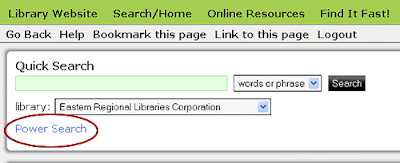
Click on the Power Search link.
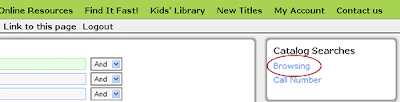
Click on the Browsing link found on the menu at the right.
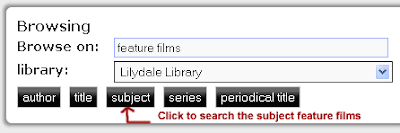
Type in feature films in the Browse Search box and select your home branch from the drop-down menu and click on the subject button.
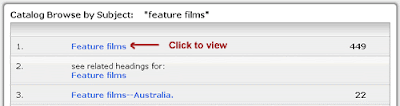
Click on Feature films from the list of results (it should have the most titles)
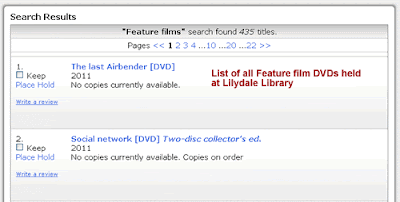
This should give you a list of Feature Films on DVD at your branch. rowse the titles to find one on shelf or returning soon.
Cheers, Maryanne

Click on the Power Search link.

Click on the Browsing link found on the menu at the right.

Type in feature films in the Browse Search box and select your home branch from the drop-down menu and click on the subject button.

Click on Feature films from the list of results (it should have the most titles)

This should give you a list of Feature Films on DVD at your branch. rowse the titles to find one on shelf or returning soon.
Cheers, Maryanne
Wednesday, May 11, 2011
Due to the library software upgrade there may currently be issues with the catalogue display
As a result of a library software upgrade certain files need to be transferred to the server and as a result the catalogue may not be displaying as it should e.g. Library Info menu appears very thin, Quick Search form partially hidden.
Once the files are transferred, the catalogue will display correctly. Thank-you for your patience.
Cheers, Maryanne
Once the files are transferred, the catalogue will display correctly. Thank-you for your patience.
Cheers, Maryanne
Wednesday, September 29, 2010
e-Library catalogue is back up, you can login and renew, search, place holds
UPDATE 9:05AM - The e-Library catalogue is back up. We apologise for any inconvenience.
Cheers, Maryanne
Cheers, Maryanne
e-Library catalogue is currently unavailable
The e-Library catalogue is currently down. SirsiDynix are investigating and we'll advise when the catalogue is available. We apologise for any inconvenience. Please try again later in the day.
Cheers, Maryanne
Cheers, Maryanne
Friday, September 03, 2010
Some issues placing holds via e-Library this morning
You may have experienced some difficulty placing holds via the e-Library catalogue this morning.
A consortium report has been running and has locked records causing some difficulty in the branches and with placing holds. Its out of our control and the report should be finished soon. Perhaps log in later in the afternoon and try placing the hold again.
Cheers, Maryanne
A consortium report has been running and has locked records causing some difficulty in the branches and with placing holds. Its out of our control and the report should be finished soon. Perhaps log in later in the afternoon and try placing the hold again.
Cheers, Maryanne
Thursday, August 12, 2010
New look catalogue - you may need to refresh your browser
I've uploaded a new stylesheet and header for the library catalogue. You'll notice that it will appear with a white header and green navigation bar instead of the old black header and white navigation bar. If you go to the catalogue and the header is still black please Shift-Refresh/Reload your browser and it will change.
View the library catalogue: http://swft.erlc.sirsidynix.net.au
We've got a new website coming toward the end of the month and the minor changes I've made here relate to that.
Cheers, Maryanne
View the library catalogue: http://swft.erlc.sirsidynix.net.au
We've got a new website coming toward the end of the month and the minor changes I've made here relate to that.
Cheers, Maryanne
Thursday, August 05, 2010
All branches are now appearing in the list on the Place Hold screen of the catalogue
The issue where only 6 of our branches were appearing on the Place Hold screen had now been fixed. You can go forth and place all of your holds.
There is still an outstanding issue where enriched content like reviews and blurbs aren't appearing and this is currently being looked at.
Cheers, Maryanne
There is still an outstanding issue where enriched content like reviews and blurbs aren't appearing and this is currently being looked at.
Cheers, Maryanne
Wednesday, August 04, 2010
Place hold on e-Library currently not displaying all libraries
There is currently an issue with Place Hold on the e-Library catalogue where all of the libraries are not displayed. Also in Internet Explorer when you go to Place Hold the style of the page appears different to the rest.
I have contacted software support and they are investigating. We hope to have a fix soon. I'll keep you updated via the blog and Twitter.
Cheers, Maryanne
I have contacted software support and they are investigating. We hope to have a fix soon. I'll keep you updated via the blog and Twitter.
Cheers, Maryanne
Monday, August 02, 2010
Enhanced content will be reappearing on the e-library catalogue soon
Thanks to everyone who has alerted us to the lack of enhanced content on the catalogue - reviews, blurb etc. These should be appearing.
We have contacted catalogue support and hope to have a fix soon.
Cheers, Maryanne
We have contacted catalogue support and hope to have a fix soon.
Cheers, Maryanne
Thursday, July 29, 2010
Searching, renewing & placing holds is going to get a whole lot cooler with BookMyne
Just thought I'd let you know that we're working on configuring the SirsiDynix BookMyne app for our library catalogue. BookMyne is a free app available through iTunes and developed for iPhone, iPod Touch and iPad. It allows you to search the catalogue, renew, place holds and check your account with a simplified screen.
Check out the SirsiDynix BookMyne site. I'll keep you notified as to when it's ready, could be in the next week or two.
Cheers, Maryanne
Check out the SirsiDynix BookMyne site. I'll keep you notified as to when it's ready, could be in the next week or two.
Cheers, Maryanne
Thursday, July 22, 2010
Viewing My Account on the catalogue
As a result of a software upgrade yesterday the checkouts and holds were not able to be viewed in My Account on the library catalogue. This issue has been fixed. If members Shift-Refresh or Shift-Reload their browsers while in the Account Summary screen you should be able to click the checkouts and holds links and the information will display.
Cheers, Maryanne
Cheers, Maryanne
Tuesday, January 05, 2010
e-Library catalogue will be down tonight
The e-Library catalogue will be unavailable from 10pm tonight for approximately 1 hour while SirsiDynix reboot the system.
Apologies for any inconvenience.
Cheers, Maryanne
Apologies for any inconvenience.
Cheers, Maryanne
Wednesday, December 23, 2009
Have you logged into your library account lately?
Did you know that you could view your library account through our website? Once logged in you can not only double check what is on your card, but renew the items as well.
Please note that the Catalogue will be unavailable Christmas & Boxing days due to maintenance.
Cheers, Maryanne
- Go to http://www.erl.vic.gov.au
- Login at the top right of the website with your userID (starting 20023) and PIN
- Click on My Account and select from the menu
Please note that the Catalogue will be unavailable Christmas & Boxing days due to maintenance.
Cheers, Maryanne
Thursday, December 10, 2009
ChiliFresh reviews added to the catalogue
We've just added a new feature to our catalogue - ChiliFresh reviews from around the world. You can even register to provide reviews of your own favourite books you've read, or perhaps a few turkeys too. :-D
You need to be logged into the e-library catalogue.
All reviews are moderated by the Web Administrator before they are uploaded. I also fix up any typos or mispellings before accepting the reviews.
Cheers, Maryanne
You need to be logged into the e-library catalogue.
- Go to www.erl.vic.gov.au
- Login with your userID & PIN
- Type in your search
- In the list of brief results a link to the reviews will appear if there are any for that title.
- If there are reviews for that title, click on the link to the number of reviews.
- Scroll to read all of the reviews. If you want to add a review yourself click on the link Add a review for this.
- You can either login with your chilifresh account, or if iyou haven't set one up you can register with ChiliFresh for free. Alternatively you can post an anonymous review.


All reviews are moderated by the Web Administrator before they are uploaded. I also fix up any typos or mispellings before accepting the reviews.
Cheers, Maryanne
Thursday, November 12, 2009
User is stopped alert on the catalogue
I've received feedback regarding the message User is Stopped when library members log in to their account. This messsage will appear if you have any outstanding charges or overdue items on your card.
If you see this message you will not be prevented from renewing your items, just click on Renew My Materials and make your selections to renew. Items may only be renewed once and items on reserve for another borrower cannot be renewed.
Cheers, Maryanne
If you see this message you will not be prevented from renewing your items, just click on Renew My Materials and make your selections to renew. Items may only be renewed once and items on reserve for another borrower cannot be renewed.
Cheers, Maryanne
Friday, November 06, 2009
A workaround for viewing My Account in Opera
Thanks to Andrew for suggesting a workaround for Opera users when using the Review My Account screen.
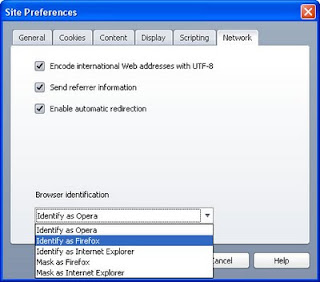
I tested it with Opera 10 and it works fine. You'll be able to see the checkouts and holds.
Cheers, Maryanne
- Go to our catalogue in Opera at http://swft.erlc.sirsidynix.net.au.
- Go to Tools > Quick Preferences > Edit Site Preferences in the browser menu at the top.
- Click on the Network tab
- Select either Identify as Firefox or Identify as Internet Explorer from the drop-down box. Also works if you select Mask.

I tested it with Opera 10 and it works fine. You'll be able to see the checkouts and holds.
Cheers, Maryanne
Wednesday, October 28, 2009
Opera & the catalogue upgrade
There is a known issue with the Opera browser when you're on the My Account - Review My Account page all you see are the tabs Account Summary, Checkouts, Holds. The rest of the information is hidden.
I have passed on the feedback that several of our members using Opera are having difficulties with the new layout. SirsiDynix, the software provider, list the following supported browsers - Internet Explorer 6 & 7, Firefox 2x & 3x, Safari on a Mac. I suggest trying one of these. I've got Internet Explorer 8 & Firefox 3 on my PC at work and it works on those. I've also tried it out on Google Chrome and although it isn't supported it seems to work fine.
Download Internet Explorer
Download Mozilla Firefox
Download Safari
Cheers, Maryanne
I have passed on the feedback that several of our members using Opera are having difficulties with the new layout. SirsiDynix, the software provider, list the following supported browsers - Internet Explorer 6 & 7, Firefox 2x & 3x, Safari on a Mac. I suggest trying one of these. I've got Internet Explorer 8 & Firefox 3 on my PC at work and it works on those. I've also tried it out on Google Chrome and although it isn't supported it seems to work fine.
Download Internet Explorer
Download Mozilla Firefox
Download Safari
Cheers, Maryanne
Subscribe to:
Posts (Atom)