Showing posts with label self check. Show all posts

Wednesday, September 08, 2010

Rowville Library will be re-opening on Thursday 9th September


I've been setting up the 3 Self Check units at Rowville Library today and they look fantastic. I've named them Bella, Buzz and Buffy.

Rowville Library will re-open at 9am tomorrow morning and staff will be guiding you in their use. It's really easy.

Cheers, Maryanne

Our Chief Executive talks about the introduction of Self Check at our libraries

Joseph Cullen, Eastern Regional Libraries' Chief Executive, answers some questions about the introduction of Self Check in our libraries in his latest blog entry.

Cheers, Maryanne

Tuesday, August 31, 2010

Rowville Library closed 6th-8th September inclusive

Rowville Library will be closed from Monday 6th September re-opening on Thursday 9th September for security gates and self check units to be installed.

There will be 3 self check units at Rowville (I'm naming them Bella, Buzz and Buffy) and we'll be on hand to show you how to use them. Its very easy.

Cheers, Maryanne

Tuesday, August 10, 2010

Belgrave Library re-opens tomorrow

Belgrave Library re-opens tomorrow at 10am after a small renovation of the desk and the addition of RFID (Radio Frequency IDentification) gates and two self check units. It looks great.

Staff will be introducing members to the Self Check units and showing how it works - I'm calling these two Ben & Barbie (Ben is on the left, Barbie on the right)...the previous ones at Montrose and Yarra Junction are called Bob and Betty respectively.

Cheers, Maryanne

Friday, June 25, 2010

Venus Self Check unit at Montrose Library

We've installed the Venus Self Check unit at the newly refurbished Montrose Library. I've been working hard on the guide to its use and receipts and can give you a sneak peek.
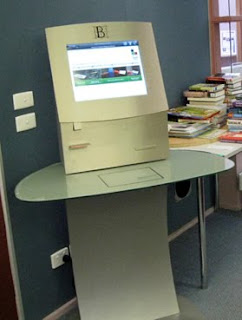


Members will be able to check out and renew their own items with the units. Its quick and easy.
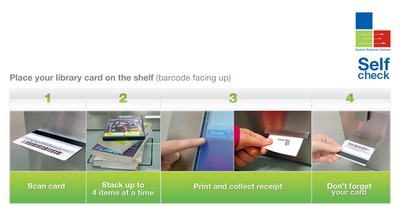


This is the welcome screen and guide to borrowing items through the Self Check.

  1. Scan your library card by placing it on the shelf with the barcode facing up.
  2. Stack your items, up to 4 at a time, on the glass. Spread them out a little so that the tags are detected. Each item successfully borrowed will display in green with a tick.
  3. Touch the Print Receipt button and collect your receipt.
  4. Don't forget your library card and items
Staff will be available to assist with any problems and to help with your book selections.

The units will be gradually introduced at our other branches in the coming months.

Cheers, webgurl