Lonely Planet are one of the latest publishers to release their books in the eBook format and you can now find over 40 of their latest titles available in our eLibrary. So if you are considering a trip overseas you can log on to the eLibrary and download a guide that will help you plan your great adventure. And while you are at it why not brush up on your foreign languages by registering with our Mango Languages online resource. By registering you are then able to download an App from the Apple App Store or the Android equivalent from Google Play that will allow you to learn your language on the go.
Aurevoir, Paul.

Showing posts with label mango languages. Show all posts
Showing posts with label mango languages. Show all posts
Friday, August 31, 2012


Monday, July 23, 2012
Learn a new language online
Are you about to head off overseas and would like to be able to order a caffe latte in Italian, French, Indonesian or Japanese? Or are you a native Mandarin speaker and would like to brush up on your English conversational skills? Or would you like to develop your swashbuckling and improve your command of 'Pirate'? Than our new language learning resource, 'Mango Languages' is the place to go.
There are over 40 foreign languages to explore and over 15 ESL (English as a Second Language) courses provided. You can also learn Ancient Greek, Latin or Biblical Hebrew if you are of a Classical mind! My favourite is Pirate.... avast there landlubbers!!
Go to the Online Resources page on our website and scroll down to Language Learning to access Mango. You can also download an App from the Apple Store or the Android Market so that you can learn on your smart device.
Aurevoir, Paul.
There are over 40 foreign languages to explore and over 15 ESL (English as a Second Language) courses provided. You can also learn Ancient Greek, Latin or Biblical Hebrew if you are of a Classical mind! My favourite is Pirate.... avast there landlubbers!!
Go to the Online Resources page on our website and scroll down to Language Learning to access Mango. You can also download an App from the Apple Store or the Android Market so that you can learn on your smart device.
Aurevoir, Paul.
Friday, February 17, 2012
Mango Languages online resource to be replaced
We have decided not to renew our subscription to the Mango Languages online resource - the pricing structure has changed rather dramatically. Instead we will be subscribing to a similar product in the not too distant future - we'll keep you informed.
Cheers, Paul.
Cheers, Paul.
Thursday, April 14, 2011
Set yourself up with a profile for Mango Languages & track your progress
Eastern Regional Libraries has recently subscribed to the Mango online language learning system. Mango uses real-life situations and actual conversations to more effectively teach a new language. Develop your conversational skills in 34 different foreign languages. English as a Second Language courses are also available for 15 community languages.
You can start learning immediately however, if you want to track your progress, you'll need to set up a profile.
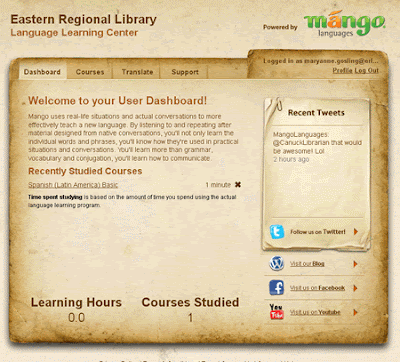
Dashboard - track your progress through the courses
Courses - Select a foreign language or english courses
Translate - translate a block of text
Support - Support topics
Cheers, Maryanne
You can start learning immediately however, if you want to track your progress, you'll need to set up a profile.
- Go to the ERL Online Resources page and select Languages from the menu at the right.
- Click on either Learn from home or Learn from Library under Mango
- Login with your user ID (library card number after 20023) and PIN
- Click on the Mango Languages link
- If you don't need to track your progress you can click the Start Learning button.
- However if you wish to track your progress, fill out the Create a Profile form by entering your email address and creating a password and click signup.
- An activation email will be sent to you. Open the Mango Languages email and click on the link supplied or copy/paste the link into your browser.
- You will be taken to the User Dashboard.


Dashboard - track your progress through the courses
Courses - Select a foreign language or english courses
Translate - translate a block of text
Support - Support topics
Cheers, Maryanne
Subscribe to:
Posts (Atom)